Why Your AI Agent Demo Works But Production Breaks (And How to Fix It)
Your agent demo is impressive. Then you deploy to production and everything falls apart. Here's why demos lie and what actually matters for production agents.

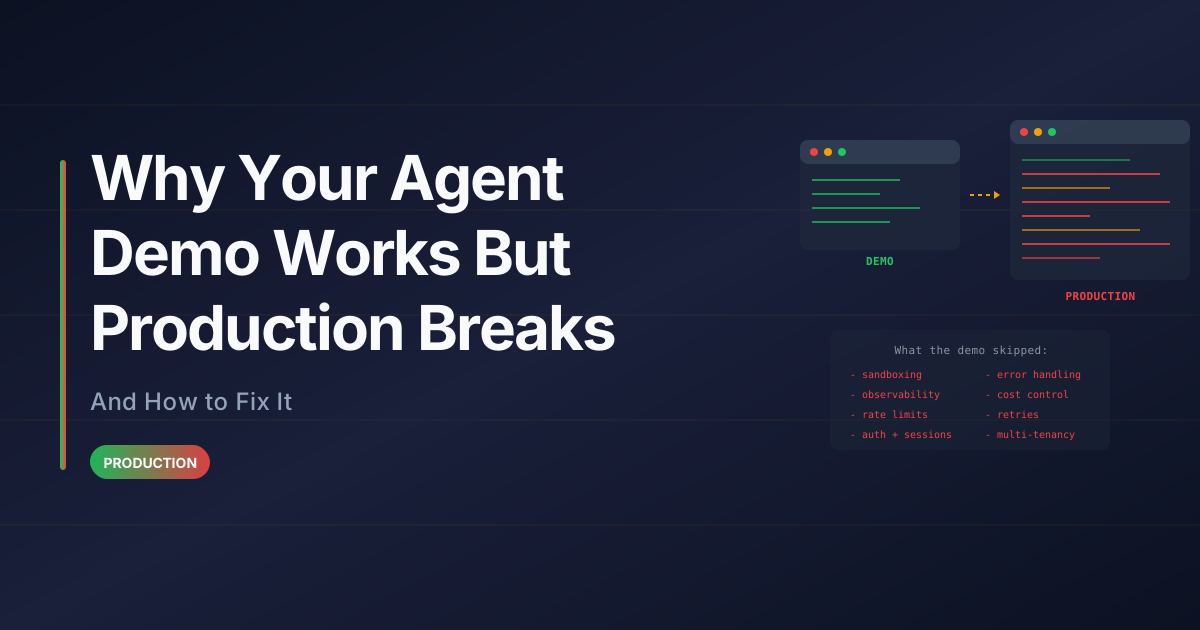
Your demo looks incredible. The agent answers questions, executes tasks, and impresses everyone in the room.
Then you deploy to production.
Within hours, you're seeing:
- Inconsistent outputs for identical inputs
- Timeouts and failed requests
- Costs spiraling beyond projections
- Users hitting edge cases you never tested
- Agents hallucinating or refusing to work
The demo worked. Production is a different game.
Here's why demos lie and what you need to build agents that survive real users.
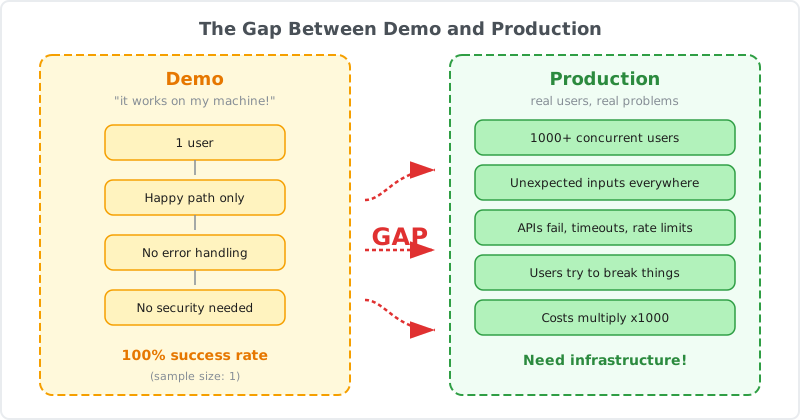
Why Demos Are Misleading
Demos optimize for the wrong metrics. They're designed to impress, to show what's possible in ideal conditions.
Production optimizes for reliability, cost, and handling the unexpected.
1. Demos Use Happy Path Data
In your demo, you control the inputs. You've tested the exact questions the agent will receive. You know which tools it will call and what the responses will be.
Production gives you:
- Misspelled queries
- Ambiguous requests
- Incomplete information
- Users testing boundaries
- Edge cases you never imagined
Your agent was trained on clean data. Production data is messy.
2. Demos Run in Ideal Conditions
During a demo:
- APIs respond instantly
- Network is stable
- No concurrent users
- Unlimited time to respond
- Fresh context every time
Production reality:
- APIs timeout or return errors
- Network latency varies
- Hundreds of concurrent requests
- Users expect sub-second responses
- Context accumulates across sessions
Your demo agent has never experienced failure. Production agents fail constantly.
3. Demos Ignore Cost
In development, you use the best models. GPT-4, Claude Opus, long context windows, multiple tool calls.
Production economics:
If your agent costs $0.50 per interaction and you have 10,000 daily users, that's $5,000/day or $150,000/month.
Suddenly, model selection, prompt optimization, and caching become critical. Your demo's generous token usage doesn't scale.
4. Demos Don't Handle State
Demos are stateless. Each interaction is fresh. No accumulated context, no session management, no cleanup.
Production requires:
- Session persistence across requests
- File uploads that persist
- Conversation history management
- Memory cleanup to avoid leaks
- State synchronization across servers
Your demo never had to manage state. Production agents live in stateful chaos.
The Production Gaps
Here are the specific gaps between demo and production that break most agents.
Gap 1: Non-Deterministic Outputs
LLMs are probabilistic. The same input can produce different outputs.
Demo scenario:
You test your agent with "Summarize this document" and it works perfectly.
Production scenario:
User A gets a 3-paragraph summary. User B gets bullet points. User C gets a single sentence. All from the same document.
Why it happens:
- Temperature settings introduce randomness
- Context window variations affect reasoning
- Model updates change behavior
- Tool call ordering isn't guaranteed
The fix:
Use structured outputs and Agent Skills to enforce consistency.
// Instead of free-form generation
const result = await generateText({
  model: openai("gpt-4o"),
  prompt: "Summarize this document",
});

// Use structured output
const result = await generateObject({
  model: openai("gpt-4o"),
  schema: z.object({
    summary: z.string().max(500),
    keyPoints: z.array(z.string()),
    sentiment: z.enum(["positive", "neutral", "negative"]),
  }),
  prompt: "Summarize this document",
});
Structured outputs reduce variance. Skills encode procedures that must be followed.
Gap 2: Timeout and Retry Logic
Demos assume everything works. Production assumes everything fails.
Demo scenario:
Agent calls an API, gets a response, continues.
Production scenario:
- API is down
- Request times out
- Rate limit exceeded
- Partial response received
- Network error mid-stream
The fix:
Implement retries with exponential backoff and graceful degradation.
async function callWithRetry(fn, maxRetries = 3) {
  for (let i = 0; i < maxRetries; i++) {
    try {
      return await fn();
    } catch (error) {
      if (i === maxRetries - 1) throw error;

      const delay = Math.pow(2, i) * 1000; // Exponential backoff
      await new Promise(resolve => setTimeout(resolve, delay));
    }
  }
}

// Use it
const result = await callWithRetry(() =>
  bluebag.enhance({ model, messages })
);
Production agents need defensive code at every integration point.
Gap 3: Context Window Management
Demos use short conversations. Production conversations grow unbounded.
Demo scenario:
3-turn conversation, 2,000 tokens total.
Production scenario:
User has a 50-turn conversation. Context window hits 100,000 tokens. Costs explode. Latency increases. Model performance degrades.
The fix:
Implement context window management.
function truncateMessages(messages, maxTokens = 8000) {
  // Keep system message and recent messages
  const systemMessages = messages.filter(m => m.role === "system");
  const recentMessages = messages.slice(-10);

  // Summarize older messages
  const olderMessages = messages.slice(0, -10);
  const summary = summarizeConversation(olderMessages);

  return [
    ...systemMessages,
    { role: "system", content: `Previous conversation summary: ${summary}` },
    ...recentMessages,
  ];
}
Or use Agent Skills with progressive disclosure to load knowledge on demand instead of upfront.
Gap 4: File Handling and Cleanup
Demos process one file. Production processes thousands with no cleanup strategy.
Demo scenario:
User uploads a PDF. Agent processes it. Demo ends.
Production scenario:
- 1,000 users upload files daily
- Files accumulate on disk
- Disk space fills up
- Server crashes
- No one knows which files to delete
The fix:
Use managed sandboxes with automatic cleanup.
Bluebag handles this automatically. Each session gets an isolated sandbox. When the session ends, files are cleaned up.
const bluebag = new Bluebag({
  apiKey: process.env.BLUEBAG_API_KEY,
  stableId: userId, // Isolated per user
});

// Files uploaded here are automatically cleaned up
// when the session expires
If you're managing your own infrastructure, implement TTLs and cleanup jobs.
Gap 5: Error Messages and Debugging
Demos fail gracefully because you control the inputs. Production fails constantly and users need to understand why.
Demo scenario:
Everything works. No errors to handle.
Production scenario:
- "Something went wrong"
- User has no idea what failed
- You have no logs to debug
- Issue can't be reproduced
The fix:
Implement structured error handling and logging.
try {
  const result = await agent.invoke({ messages });
} catch (error) {
  // Log for debugging
  logger.error("Agent execution failed", {
    userId,
    sessionId,
    error: error.message,
    stack: error.stack,
    messages: messages.slice(-3), // Recent context
  });

  // User-friendly error
  if (error.code === "RATE_LIMIT") {
    return "I'm experiencing high demand. Please try again in a moment.";
  } else if (error.code === "TIMEOUT") {
    return "This is taking longer than expected. Let me try a simpler approach.";
  } else {
    return "I encountered an issue. Our team has been notified.";
  }
}
Production agents need observability at every layer.
Gap 6: Concurrent Users
Demos have one user. Production has thousands hitting your agent simultaneously.
Demo scenario:
Single user, no contention, unlimited resources.
Production scenario:
- 500 concurrent requests
- Shared resources (databases, APIs, sandboxes)
- Rate limits hit across all users
- Memory and CPU constraints
The fix:
Design for concurrency from day one.
- Use stateless architectures where possible
- Implement request queuing
- Set per-user rate limits
- Scale horizontally
- Use managed infrastructure (like Bluebag) that handles concurrency
// Rate limiting per user
const rateLimiter = new RateLimiter({
  points: 10, // 10 requests
  duration: 60, // per 60 seconds
});

app.post("/api/agent", async (req, res) => {
  try {
    await rateLimiter.consume(req.userId);
    // Process request
  } catch {
    res.status(429).send("Too many requests. Please slow down.");
  }
});
Gap 7: Cost Monitoring
Demos don't track costs. Production costs can spiral out of control.
Demo scenario:
Use the best model, longest context, multiple tool calls. Cost is irrelevant.
Production scenario:
- $10,000 bill at end of month
- No visibility into per-user costs
- Can't identify expensive queries
- No budget alerts
The fix:
Implement cost tracking and budgets.
// Track token usage
const result = await streamText(config);

const usage = {
  promptTokens: result.usage.promptTokens,
  completionTokens: result.usage.completionTokens,
  totalTokens: result.usage.totalTokens,
};

// Log for analysis
await logUsage({
  userId,
  sessionId,
  model: "gpt-4o",
  usage,
  estimatedCost: calculateCost(usage, "gpt-4o"),
});

// Alert if user exceeds budget
if (userCosts[userId] > USER_BUDGET) {
  await notifyUser(userId, "You've reached your usage limit.");
}
Set up dashboards to monitor costs in real-time. Optimize expensive queries. Switch to cheaper models for simple tasks.
The Production Checklist
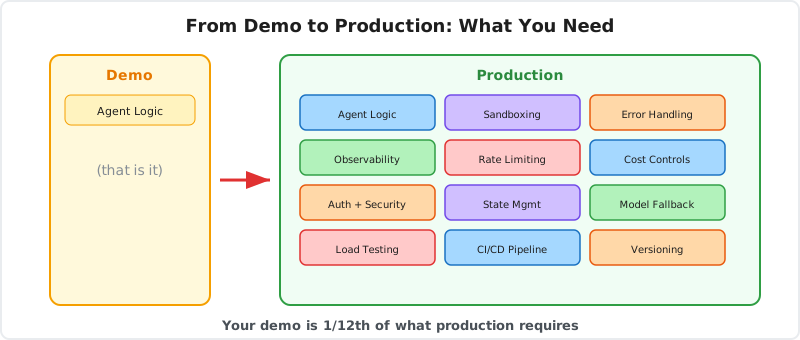
Before deploying your agent to production, ensure you have:
Infrastructure
- Sandboxed execution environments
- Automatic scaling for concurrent users
- File upload and cleanup strategy
- Session management and persistence
- Health checks and monitoring
Reliability
- Retry logic with exponential backoff
- Timeout handling
- Graceful degradation when services fail
- Fallback models or responses
- Circuit breakers for failing dependencies
Observability
- Structured logging for all agent actions
- Error tracking and alerting
- Performance metrics (latency, token usage)
- Cost tracking per user and session
- Trace IDs for debugging
Cost Management
- Token usage monitoring
- Per-user rate limits
- Budget alerts
- Model selection strategy (cheap vs expensive)
- Caching for repeated queries
User Experience
- Consistent output formats
- Clear error messages
- Response time SLAs
- Progressive loading for slow operations
- Conversation history management
Security
- Input validation and sanitization
- Isolated sandboxes per user
- API key rotation
- Audit logs for sensitive operations
- Rate limiting to prevent abuse
How Bluebag Solves Production Problems
We built Bluebag because we kept seeing teams hit the same production issues.
What Bluebag provides:
Managed Sandboxes
Isolated execution environments per user. Automatic cleanup. No infrastructure code.
Built-In Observability
Every Skill execution is logged. See what ran, when, and why. Debug production issues with full context.
Cost Optimization
Skills use progressive disclosure to minimize token usage. Load knowledge on demand instead of upfront.
Reliability
Automatic retry on session and sandbox errors. Production-grade infrastructure from day one.
LLM Flexibility
Switch models without rewriting code. Optimize costs by routing different workloads to different models.
Production agents need production infrastructure. Bluebag provides it so you can focus on building features instead of managing sandboxes.
Conclusion
Demos optimize for showing what's possible. Production optimizes for handling what's probable.
Your demo works because you control the environment. Production breaks because users do unexpected things, APIs fail, costs matter, and scale reveals weaknesses.
The gap between demo and production is:
- Non-deterministic outputs
- Missing retry logic
- Unbounded context windows
- File handling without cleanup
- Poor error messages
- No concurrency planning
- Unmonitored costs
Fix these gaps before you deploy. Use structured outputs, implement retries, manage context, handle files properly, log everything, design for concurrency, and track costs.
Or use infrastructure that solves these problems for you.
Demos are easy. Production is hard. Build for production from day one.
Resources
- Bluebag Documentation - Production-ready agent infrastructure
- Agent Skills Specification - Structured knowledge for agents
- Vercel AI SDK - Building AI applications
- LangChain Production Guide - Production best practices
Shipping agents to production? Start with Bluebag and avoid the gaps that break most demos.