LangChain + BlueBag: How to Add Sandboxed Skills to Any LangChain Agent
Add production-ready Agent Skills to your LangChain agents in minutes. Sandboxed execution, file handling, and structured workflows without building infrastructure.

LangChain gives you the framework for building agents. Tools, chains, memory, retrieval. The pieces are there.
But when your agent needs to execute code, process files, or follow complex multi-step workflows, you hit a wall. You need sandboxed execution environments, dependency management, file systems, and security isolation.
Building that infrastructure takes months. Bluebag gives it to you in minutes.
The Sandbox Problem
Here's a common scenario: You're building a data analysis agent with LangChain. A user uploads a CSV file and asks for insights.
Your agent needs to:
- Parse the CSV
- Run statistical analysis
- Generate visualizations
- Return structured results
With standard LangChain tools, you have two options:
Option 1: Execute code directly on your server
@tool
def analyze_csv(file_path: str) -> str:
    """Analyze a CSV file."""
    # This runs on YOUR server
    df = pd.read_csv(file_path)
    return df.describe().to_string()
Problems:
- Security risk (arbitrary code execution)
- No isolation between users
- Dependencies pollute your environment
- File access is unrestricted
Option 2: Build a sandboxing system
You could build Docker containers, manage VM provisioning, handle file uploads, install dependencies dynamically, and implement cleanup.
This works, but it's months of infrastructure work before you ship a single feature.
Bluebag solves this. It provides production-grade sandboxes for LangChain agents with zero infrastructure code.
How Bluebag Works with LangChain
Bluebag adds Agent Skills to your LangChain agents. Skills are structured packages that contain:
- Instructions: Workflow documentation for the agent
- Scripts: Executable code (Python, Node.js, shell)
- Resources: Templates, references, configuration files
- Dependencies: Automatic package installation
Each Skill runs in an isolated sandbox. Users get separate environments. Files stay isolated. Dependencies are managed automatically.
Architecture
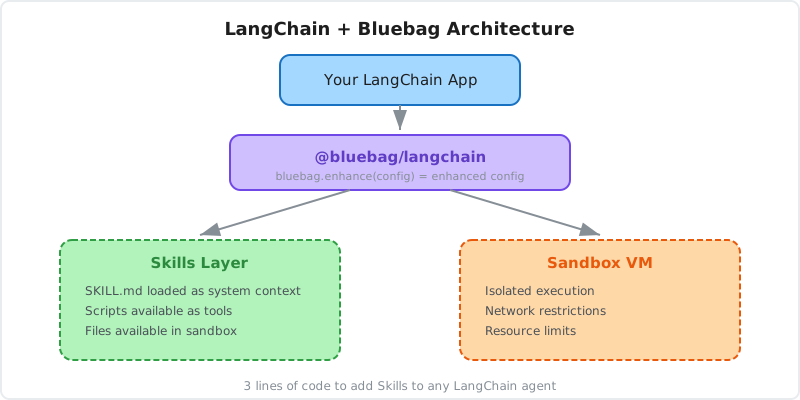
Bluebag intercepts your LangChain config, injects Skill-based tools, and handles sandbox orchestration behind the scenes.
Quick Start: Adding Skills to LangChain
Let's build a data analysis agent that can process CSV files securely.
1. Install Dependencies
npm install @bluebag/langchain langchain @langchain/openai2. Create a Skill
Create a directory called csv-analyzer:
csv-analyzer/
├── SKILL.md
├── scripts/
│   └── analyze.py
└── requirements.txt
SKILL.md:
---
name: csv-analyzer
description: Analyze CSV files and generate statistical insights. Use when the user uploads a CSV or asks for data analysis.
---

# CSV Analyzer

This Skill analyzes CSV files and provides statistical summaries.

## Usage

When the user uploads a CSV file, run:

```bash
python /skills/csv-analyzer/scripts/analyze.py <file_path>
```

The script outputs:
- Row and column counts
- Data types
- Statistical summary
- Missing value analysis
scripts/analyze.py:
#!/usr/bin/env python3
import sys
import pandas as pd
import json

def analyze_csv(file_path):
    df = pd.read_csv(file_path)

    analysis = {
        "shape": {"rows": len(df), "columns": len(df.columns)},
        "columns": list(df.columns),
        "dtypes": df.dtypes.astype(str).to_dict(),
        "summary": df.describe().to_dict(),
        "missing": df.isnull().sum().to_dict(),
    }

    return json.dumps(analysis, indent=2)

if __name__ == "__main__":
    if len(sys.argv) < 2:
        print("Usage: analyze.py <csv_file>", file=sys.stderr)
        sys.exit(1)

    result = analyze_csv(sys.argv[1])
    print(result)
requirements.txt:
pandas==2.1.4
3. Push the Skill to Bluebag
npm install -g @bluebag/cli
bluebag login
bluebag push ./csv-analyzer
Your Skill is now deployed and ready to use.
4. Use in Your LangChain Agent
import { createAgent } from "langchain";
import { HumanMessage } from "@langchain/core/messages";
import { Bluebag } from "@bluebag/langchain";

const bluebag = new Bluebag({
  apiKey: process.env.BLUEBAG_API_KEY,
  activeSkills: ["csv-analyzer"],
});

const config = await bluebag.enhance({
  model: "openai:gpt-4o",
  systemMessage: "You are a data analysis assistant. Help users understand their data.",
  messages: [
    new HumanMessage("Analyze this sales data"),
  ],
});

const agent = createAgent({
  model: config.model,
  tools: config.tools,
  systemPrompt: config.systemMessage,
});

const result = await agent.invoke({ messages: config.messages });
console.log(result.messages.at(-1)?.content);
What happens:
- Bluebag uploads
sales_data.csvto an isolated sandbox - The agent receives tools for the
csv-analyzerSkill - When the agent decides to analyze the file, it calls the Skill
- The Python script runs in the sandbox with pandas installed
- Results are returned to the agent
- The agent formats insights for the user
Zero infrastructure code. Fully sandboxed. Production-ready.
File Handling
Bluebag handles file uploads and makes them available to the agent's tools in the sandbox.
Uploading Files
Use files.create to upload files before running the agent:
const uploaded = await bluebag.files.create({
  file: reportBuffer,
  filename: "report.pdf",
  mediaType: "application/pdf",
});

console.log(uploaded.fileId); // Reference this file later

const config = await bluebag.enhance({
  model: "openai:gpt-4o",
  messages: [new HumanMessage("Process this report")],
});
The uploaded file is now available to the agent's tools in the sandbox.
Accessing Generated Files
When tools create files during execution, metadata is included in the tool result's artifacts array:
// After agent execution, tool results include artifact metadata
const artifact = toolResult.artifacts[0];
console.log(`Created: ${artifact.filename} (${artifact.size} bytes)`);

// Download the generated file
const downloadUrl = await bluebag.files.mintShortLivedDownloadUrl(artifact.fileId);

// Or download directly
const blob = await bluebag.files.download(artifact.fileId);
Each artifact includes a fileId, filename, path, size, and expiryAt.
Persisting Files
By default, files expire after a period of time. To keep a file beyond its default expiry:
const persisted = await bluebag.files.persist(artifact.fileId);
console.log(`File will now expire at: ${persisted.expiryAt}`);
Session Isolation with stableId
By default, each request gets a fresh sandbox. For multi-turn conversations, use stableId to maintain session state:
const bluebag = new Bluebag({
  apiKey: process.env.BLUEBAG_API_KEY,
  stableId: userId, // Persistent sandbox per user
});
Now:
- Files persist across requests
- Installed packages stay available
- Working directory state is maintained
This enables workflows like:
- User uploads a dataset
- Agent explores the data
- User asks follow-up questions
- Agent references the same dataset without re-uploading
Restricting Skills
You might have multiple Skills but only want certain ones active for specific agents.
const bluebag = new Bluebag({
  apiKey: process.env.BLUEBAG_API_KEY,
  activeSkills: ["csv-analyzer", "data-visualization"],
});
Only the specified Skills are loaded. This:
- Reduces token usage
- Prevents unintended Skill execution
- Keeps agents focused
Combining Custom Tools with Skills
Bluebag doesn't replace your custom LangChain tools. It augments them.
import { tool } from "@langchain/core/tools";
import { z } from "zod";

// Your custom tool
const getWeather = tool(
  ({ city }) => `Weather in ${city}: Sunny, 72°F`,
  {
    name: "get_weather",
    description: "Get current weather for a city",
    schema: z.object({ city: z.string() }),
  }
);

// Bluebag merges Skills with your tools
const config = await bluebag.enhance({
  model: "openai:gpt-4o",
  tools: [getWeather], // Your custom tools
  systemMessage: "You are a helpful assistant.",
  messages: [new HumanMessage("What's the weather in SF? Also analyze data.csv")],
});

const agent = createAgent({
  model: config.model,
  tools: config.tools, // Includes both custom tools and Skill tools
  systemPrompt: config.systemMessage,
});
The agent now has:
- Your custom
get_weathertool - All tools from active Skills
It chooses the right tool based on the user's request.
Real-World Example: Document Processing Agent
Let's build a more complex agent that processes PDFs, extracts tables, and generates summaries.
Create the Skill
pdf-processor/
├── SKILL.md
├── scripts/
│   ├── extract_text.py
│   ├── extract_tables.py
│   └── summarize.py
└── requirements.txt
requirements.txt:
pdfplumber==0.10.3
pandas==2.1.4
openai==1.12.0
scripts/extract_text.py:
#!/usr/bin/env python3
import sys
import pdfplumber

def extract_text(pdf_path):
    with pdfplumber.open(pdf_path) as pdf:
        text = ""
        for page in pdf.pages:
            text += page.extract_text() or ""
            text += "\n\n"
    return text.strip()

if __name__ == "__main__":
    result = extract_text(sys.argv[1])
    print(result)
scripts/extract_tables.py:
#!/usr/bin/env python3
import sys
import pdfplumber
import pandas as pd
import json

def extract_tables(pdf_path):
    tables = []
    with pdfplumber.open(pdf_path) as pdf:
        for page_num, page in enumerate(pdf.pages, 1):
            page_tables = page.extract_tables()
            for table in page_tables:
                if table:
                    df = pd.DataFrame(table[1:], columns=table[0])
                    tables.append({
                        "page": page_num,
                        "data": df.to_dict(orient="records")
                    })
    return json.dumps(tables, indent=2)

if __name__ == "__main__":
    result = extract_tables(sys.argv[1])
    print(result)
SKILL.md:
---
name: pdf-processor
description: Extract text and tables from PDF documents. Use when working with PDF files.
---

# PDF Processor

Extract content from PDF files.

## Extract Text

```bash
python /skills/pdf-processor/scripts/extract_text.py <pdf_path>
```

## Extract Tables

```bash
python /skills/pdf-processor/scripts/extract_tables.py <pdf_path>
```

Returns JSON with table data and page numbers.
Deploy and Use
bluebag push ./pdf-processorconst bluebag = new Bluebag({
apiKey: process.env.BLUEBAG_API_KEY,
activeSkills: ["pdf-processor"],
stableId: userId,
});
const config = await bluebag.enhance({
model: "openai:gpt-4o",
systemMessage: "You are a document analysis assistant.",
messages: [
new HumanMessage("Extract all tables from this financial report"),
],
});
const agent = createAgent({
model: config.model,
tools: config.tools,
systemPrompt: config.systemMessage,
});
const result = await agent.invoke({ messages: config.messages });The agent:
- Receives the PDF in its sandbox
- Calls the table extraction script
- Parses the JSON results
- Formats findings for the user
All dependencies (pdfplumber, pandas) are installed automatically in the sandbox.
Debugging and Observability
Bluebag provides execution logs for every Skill invocation.
Access logs through the Bluebag Insights dashboard:
- Which Skills were called
- Exit codes and error status
- Execution time (duration_ms)
- Tool usage patterns
This makes debugging production agents straightforward. When something breaks, you can see exactly which Skills ran and whether they succeeded or failed.
Security Model
Every sandbox is isolated:
- Process isolation: Each session runs in its own sandboxed environment
- File system isolation: Users cannot access each other's files (scoped by session)
- Network restrictions: Sandboxes have restricted network access with allowlisted domains
- Resource limits: Sandboxes are time-limited and automatically cleaned up
Skills run with restricted permissions. They can't:
- Access your server's file system
- Make arbitrary network requests (unless explicitly allowed)
- Interfere with other users' sessions
Performance
Bluebag sandboxes are fast:
- Sub-90ms sandbox creation
- Automatic cleanup after session ends
For high-throughput agents, Bluebag scales horizontally. Each request gets its own sandbox, and the platform handles orchestration.
Migration from Custom Sandboxing
If you've built custom sandboxing for your LangChain agents, migrating to Bluebag simplifies your stack:
Before:
// Custom Docker orchestration
const containerId = await docker.createContainer({...});
await docker.start(containerId);
await docker.uploadFile(containerId, file);
const result = await docker.exec(containerId, command);
await docker.stop(containerId);
await docker.remove(containerId);
After:
const config = await bluebag.enhance({
  model: "openai:gpt-4o",
  messages: [new HumanMessage("Process this data")],
});
Bluebag handles container lifecycle, file uploads, execution, and cleanup.
Build vs Buy
Compare the effort of building your own sandboxing infrastructure:
- VM provisioning and container orchestration
- File upload/download pipelines
- Dependency management and caching
- Security monitoring and isolation
- Session lifecycle and cleanup
- Ongoing maintenance and scaling
Bluebag handles all of this. You focus on building your agent, not the infrastructure underneath it.
When to Use Bluebag with LangChain
Use Bluebag when your agent needs to:
- Execute code securely (Python, Node.js, shell scripts)
- Process uploaded files (PDFs, CSVs, images)
- Follow complex multi-step workflows
- Install and use external packages
- Generate files (charts, reports, processed data)
- Maintain session state across requests
Skip Bluebag if:
- Your agent only needs API calls (use standard LangChain tools)
- You're building purely conversational agents
- You already have robust sandboxing infrastructure
Conclusion
LangChain provides the framework for building agents. Bluebag provides the runtime for executing Skills.
Together, they let you build production-grade agents without months of infrastructure work:
- Sandboxed execution in isolated VMs
- Automatic dependency management
- File handling and persistence
- Session isolation per user
- Observability and debugging
Two lines of code. Production-ready sandboxes. Zero infrastructure.
If you're building LangChain agents that need to execute code or process files, Bluebag gives you the infrastructure you'd otherwise spend months building.
Resources
- Bluebag LangChain Docs - Full integration guide
- LangChain Documentation - LangChain basics
- Agent Skills Specification - Open standard for Skills
- Bluebag CLI - Push and manage Skills
Building LangChain agents? Add sandboxed Skills with Bluebag and ship secure, production-ready agents in minutes.