How to add Agent Skills to your Vercel's AI SDK Agents
Transform generic AI agents into domain experts with Agent Skills. Add battle-tested knowledge to Vercel AI SDK agents in three lines of code.


Here's something you probably didn't know:
You can use Agent Skills in your AI-SDK agents.
And once you do, your agent stops being a generic bot that hallucinates and becomes a specialist grounded in your product's real-world expertise.
Let me show you how with a singular use case: a React best practices agent.
The Problem With Generic AI Agents
Here's a conversation I've had too many times:
Me: What's the best way to handle form state in React?
Generic LLM: You could use useState, or Redux, or Formik, or React Hook Form, or Zustand, or..."
The agent isn't wrong. It's just... unhelpfully correct. It knows about React, but it doesn't have strong opinions on how production teams actually write React.
This is the gap between general knowledge and procedural expertise.
LLMs have "read" every React tutorial ever written. But they haven't spent 10 years shipping production React apps at scale. They don't have opinions. They don't have battle scars.
Let's fix this with Agent Skills.
What Are Agent Skills?
Agent Skills are packages of specialized knowledge and workflows that transform a general-purpose AI agent into a domain expert.
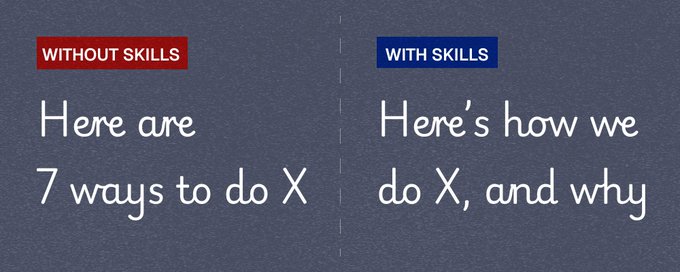
Think of them like this:
Without Skills:
- Generic patterns from docs
- No opinions
- Hallucinates edge cases
With Skills:
- Battle-tested patterns from production (your specific workflow)
- Strong, reasoned opinions
- Handles edge cases correctly
Skills also follow a progressive disclosure model
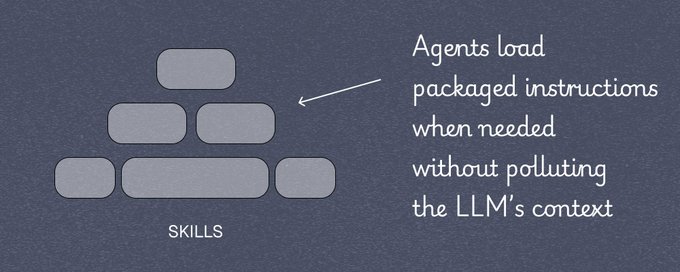
-
Discovery: Only the Skill's name and description are loaded (~100 tokens)
-
Instructions: When triggered, the agent reads the full workflow
-
Resources: Scripts, templates, and references are accessed only when needed
This keeps your context window lean while giving deep expertise when it matters.
The Real-World Example: Agent RBP
Okay, enough said. Let's try a real world application of Skills in a vercel ai-sdk agent.
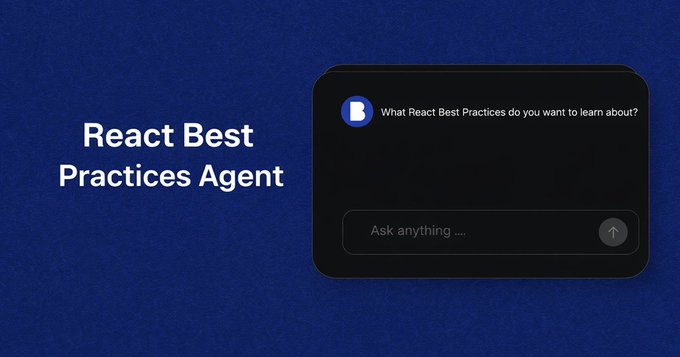
https://www.reactbestpractices.online
This agent takes the official Vercel and Nextjs React best practices Skills and allows remote access from an agent.
Vercel's AI SDK is incredibly powerful, but it doesn't have native Skills support.
That's where Bluebag comes in. It's the bridge that connects your AI SDK agent to Agent Skills.
import { streamText } from "ai";

const result = streamText({
  model: yourModel,
  messages: messages,
  system: "You are a helpful assistant...",
});

// after, with Bluebag:
import { streamText } from "ai";
import { Bluebag } from "@bluebag/ai-sdk";

const bluebag = new Bluebag({
  apiKey: process.env.BLUEBAG_API_KEY,
});

const config = await bluebag.enhance({
  model: yourModel,
  messages: messages,
  system: "You are a helpful assistant...",
});

const result = streamText(config);
That's it. Three lines of code to go from generic to grounded via Skills.
The bluebag.enhance method fetches the Skills available to your API key and makes it available to your agent via remote virtual machines.
It also adds relevant tools to operate the sandbox. Eventually it returns an enhanced config object ready for streamText, generateText, or any AI SDK method.
Step-by-Step: From API Key to Live
Let's build this from scratch. Total time: under 10 minutes.
Step 1: Get Your Bluebag API Key (2 min)
- Go to bluebag.ai and sign up
- Create a project in your dashboard
- Navigate to API Keys in the sidebar
- Click Create API Key
- Copy it immediately (you won't see it again)
Add to your .env.local : BLUEBAG_API_KEY=bb_your_key_here
⚠️ Keep this key server-side only. Never expose it in client-side code.
Step 2: Install the Package (30 sec)
npm install @bluebag/ai-sdk
Step 3: Initialize Bluebag (1 min)
At the top of your API route (before your handler):
// Instead of this:
const result = streamText({
 model: getLanguageModel("gpt-4"),
 system: systemPrompt,
 messages: messages
});

// Do this:
const enhancedConfig = await bluebag.enhance({
  model: getLanguageModel("gpt-4"),
  system: systemPrompt,
  messages: messages
})

const result = streamText(enhancedConfig);
Step 5: Deploy and Test (2 min)
Open your app and ask a React question. Your agent now has access to the Skills associated with your API key.
npm run devGive it a try at www.reactbestpractices.online/
Why This Matters
In this specific use case:
- No More Hallucinated Patterns
Skills contain vetted, production-tested knowledge. Your agent stops inventing patterns and starts following proven ones.
- Consistent Output Quality
Every response is grounded in the same expertise. No more variance based on how the LLM is feeling today.
-
Update Knowledge Without Changing Code Skills are managed separately from your agent code. Update a Skill, and every agent using it gets smarter, no redeployment needed.
-
Works for Any Domain React Best Practices is just one example. The same pattern works for your company's coding standards, industry-specific compliance rules, internal tooling workflows, customer support procedures.
If you map your ai-agent's behaviour into standard operating procedures, use Skills.
Try It Yourself. Agent RBP is open source. Clone it, run it locally, and see Skills in action: https://github.com/ohansFavour/react-best-practices-agent.
Conclusion
Most developers using Vercel's AI SDK don't know they can use it with Agent Skills.
Now you do.
Three lines of code. And your agent goes from generic to grounded.
Stop building AI agents that hallucinate or can't follow critical workflows. Start building agents that know what they're doing.
Resources
Agent RBP on GitHub: Full source code
Bluebag Documentation: Complete guides and API reference
Bluebag Dashboard : Create your API key and manage Skills
Built something cool with Bluebag and AI SDK? Share it with us @BluebagAI