The Complete Guide to AI Agent Skills: From Prototype to Production
Everything you need to know about Agent Skills. What they are, why they matter, how to build them, and how to deploy them in production.

Agent Skills changed how we build AI agents. Instead of cramming everything into prompts, we give agents structured procedural knowledge.
This is the complete guide. What Skills are, why they matter, how to build them, and how to deploy them in production.
What Are Agent Skills?
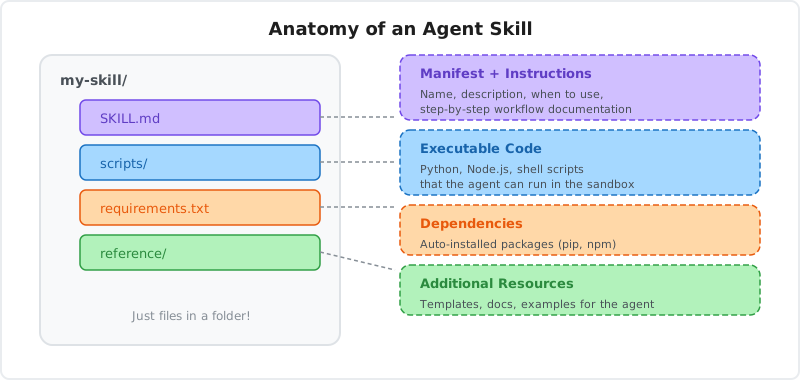
Agent Skills are structured packages that give agents procedural knowledge. They contain:
- Instructions: Step-by-step workflows
- Scripts: Executable code (Python, Node.js, shell)
- Resources: Templates, references, documentation
- Dependencies: Required packages
Think of Skills as specialized training modules. Instead of teaching an agent through prompts, you give it a Skill that encodes exactly how to perform a task.
The Problem Skills Solve
LLMs have general knowledge. They know what Python is, what data analysis means, what a CSV file looks like.
But they don't have procedural knowledge. They don't know:
- How your team structures data analysis reports
- What specific libraries and versions you use
- What edge cases to handle
- What output format you expect
Skills bridge this gap. They encode your team's procedures so agents execute tasks consistently.
How Skills Work
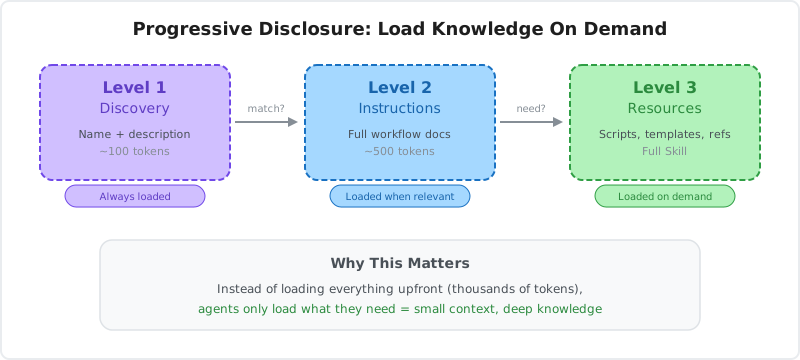
Skills use progressive disclosure to minimize token usage:
Level 1: Discovery
The agent sees the Skill's name and description (around 100 tokens):
Name: csv-analyzer
Description: Analyze CSV files and generate statistical insights
Level 2: Instructions
When the user's request matches the Skill, the agent loads the full instructions:
# CSV Analyzer

When the user uploads a CSV file:

1. Validate the file format
2. Run the analysis script
3. Format results as a table
4. Highlight key insights
Level 3: Resources
As needed, the agent reads scripts, templates, and references:
# scripts/analyze.py
import pandas as pd
# ... analysis code
This keeps context windows small while providing deep knowledge on demand.
Why Skills Matter
Skills make agents reliable. Here's why:
1. Consistency
Without Skills, agents improvise. The same request produces different outputs.
With Skills, agents follow defined procedures. Outputs are consistent.
Example:
Task: Generate a sales report
Without Skills:
- Run 1: Bullet points
- Run 2: Paragraph format
- Run 3: Table with different columns
With Skills:
- Every run: Same table structure, same metrics, same format
2. Complexity
Some tasks are too complex for prompts. Multi-step workflows with conditional logic, error handling, and state management.
Skills encode this complexity as executable procedures.
Example:
Task: Process invoice and update accounting system
Without Skills:
Agent tries to describe the process in natural language. Misses edge cases. Fails on unusual inputs.
With Skills:
Agent executes a script that handles validation, processing, error recovery, and updates. Works reliably.
3. Maintainability
Prompts are hard to version and update. Skills are code. They live in Git, have version history, and can be reviewed.
Example:
Your data analysis process changes. New columns are required.
Without Skills:
Update prompts across multiple agents. Hope you didn't miss any. No way to roll back if something breaks.
With Skills:
Update the Skill. Push to Git. Deploy through CI/CD. Roll back if needed.
4. Reusability
Skills are portable. Write once, use across multiple agents and projects.
Example:
You build a PDF processing Skill. It works in:
- Your document analysis agent
- Your invoice processing agent
- Your research assistant agent
Same Skill, different contexts.
Anatomy of a Skill
Let's build a Skill from scratch to understand the structure.
The SKILL.md File
Every Skill has a SKILL.md file. This is the manifest.
---
name: pdf-processor
description: Extract text, tables, and images from PDF files. Use when working with PDF documents.
---

# PDF Processor

This Skill processes PDF files and extracts structured content.

## When to Use

Use this Skill when the user:

- Uploads a PDF file
- Asks to extract text from a PDF
- Needs to analyze PDF content
- Wants to convert PDF tables to data

## Usage

### Extract Text

To extract all text from a PDF:

```bash
python /skills/pdf-processor/scripts/extract_text.py <pdf_path>
```

Returns plain text content.

### Extract Tables

To extract tables as JSON:

```bash
python /skills/pdf-processor/scripts/extract_tables.py <pdf_path>
```

Returns JSON array of tables with page numbers.

## Scripts

- `scripts/extract_text.py` - Text extraction
- `scripts/extract_tables.py` - Table extraction
- `scripts/extract_images.py` - Image extraction

## References

For handling encrypted PDFs, see `reference/encryption.md`.
The Scripts Directory
Scripts are executable code the agent can run.
scripts/extract_text.py:
#!/usr/bin/env python3
"""Extract text from PDF files."""

import sys
import pdfplumber

def extract_text(pdf_path):
    """Extract all text from a PDF."""
    with pdfplumber.open(pdf_path) as pdf:
        text = ""
        for page in pdf.pages:
            text += page.extract_text() or ""
            text += "\n\n"
    return text.strip()

if __name__ == "__main__":
    if len(sys.argv) < 2:
        print("Usage: extract_text.py <pdf_path>", file=sys.stderr)
        sys.exit(1)

    pdf_path = sys.argv[1]

    try:
        result = extract_text(pdf_path)
        print(result)
    except Exception as e:
        print(f"Error: {e}", file=sys.stderr)
        sys.exit(1)
The Dependencies File
Declare required packages in requirements.txt (Python) or package.json (Node.js).
requirements.txt:
pdfplumber==0.10.3
pandas==2.1.4
When the Skill runs, these packages are automatically installed in the sandbox.
The Reference Directory
Additional documentation and templates.
reference/encryption.md:
# Handling Encrypted PDFs

If a PDF is password-protected, use the `--password` flag:

```bash
python scripts/extract_text.py document.pdf --password secret123
```

For PDFs with certificate encryption, see the PyPDF2 documentation.
Complete Structure
pdf-processor/
├── SKILL.md              # Manifest and main instructions
├── requirements.txt      # Python dependencies
├── scripts/
│   ├── extract_text.py   # Text extraction
│   ├── extract_tables.py # Table extraction
│   └── extract_images.py # Image extraction
└── reference/
    ├── encryption.md     # Handling encrypted PDFs
    └── examples.md       # Usage examples
Building Your First Skill
Let's build a practical Skill step by step.
Use Case: Data Visualization
We'll build a Skill that generates charts from data.
Step 1: Create the directory
mkdir data-visualizer
cd data-visualizer
Step 2: Write SKILL.md
---
name: data-visualizer
description: Generate charts and visualizations from data. Use when the user wants to visualize data or create graphs.
---

# Data Visualizer

Create charts from CSV data or raw numbers.

## Usage

### Generate Bar Chart

```bash
python /skills/data-visualizer/scripts/bar_chart.py <data_file> <output_file>
```

### Generate Line Chart

```bash
python /skills/data-visualizer/scripts/line_chart.py <data_file> <output_file>
```

### Generate Pie Chart

```bash
python /skills/data-visualizer/scripts/pie_chart.py <data_file> <output_file>
```

## Output

All scripts generate PNG images saved to the specified output file.
Step 3: Create scripts
scripts/bar_chart.py:
#!/usr/bin/env python3
import sys
import pandas as pd
import matplotlib.pyplot as plt

def create_bar_chart(data_file, output_file):
    df = pd.read_csv(data_file)

    # Assume first column is labels, second is values
    labels = df.iloc[:, 0]
    values = df.iloc[:, 1]

    plt.figure(figsize=(10, 6))
    plt.bar(labels, values)
    plt.xlabel(df.columns[0])
    plt.ylabel(df.columns[1])
    plt.title(f"{df.columns[1]} by {df.columns[0]}")
    plt.xticks(rotation=45, ha='right')
    plt.tight_layout()
    plt.savefig(output_file)

    print(f"Chart saved to {output_file}")

if __name__ == "__main__":
    if len(sys.argv) < 3:
        print("Usage: bar_chart.py <data_file> <output_file>")
        sys.exit(1)

    create_bar_chart(sys.argv[1], sys.argv[2])
Step 4: Add dependencies
requirements.txt:
pandas==2.1.4
matplotlib==3.8.2
Step 5: Test locally
# Create test data
echo "Product,Sales\nA,100\nB,150\nC,80" > test.csv

# Run the script
python scripts/bar_chart.py test.csv output.png

# Verify output
ls -l output.png
Step 6: Deploy
bluebag push ./data-visualizerYour Skill is now available to agents.
Using Skills in Agents
Once you've built a Skill, use it in your agents.
With Vercel AI SDK
import { streamText } from "ai";
import { openai } from "@ai-sdk/openai";
import { Bluebag } from "@bluebag/ai-sdk";

const bluebag = new Bluebag({
  apiKey: process.env.BLUEBAG_API_KEY,
  activeSkills: ["data-visualizer"],
});

const config = await bluebag.enhance({
  model: openai("gpt-4o"),
  messages: [
    {
      role: "user",
      content: "Create a bar chart from this sales data",
    },
  ],
});

const result = streamText(config);
The agent:
- Sees the Skill is available
- Reads the instructions
- Executes the bar chart script
- Returns the generated image
With LangChain
import { createAgent } from "langchain";
import { HumanMessage } from "@langchain/core/messages";
import { Bluebag } from "@bluebag/langchain";

const bluebag = new Bluebag({
  apiKey: process.env.BLUEBAG_API_KEY,
  activeSkills: ["data-visualizer"],
});

const config = await bluebag.enhance({
  model: "openai:gpt-4o",
  messages: [new HumanMessage("Visualize this data")],
});

const agent = createAgent({
  model: config.model,
  tools: config.tools,
  systemPrompt: config.systemMessage,
});

const result = await agent.invoke({ messages: config.messages });
Advanced Patterns
Once you understand the basics, here are advanced patterns.
Pattern 1: Multi-Step Workflows
Skills can orchestrate complex workflows. Here's how an Invoice Processor Skill would structure its workflow in SKILL.md:
Step 1 -- Validate Invoice
python scripts/validate.py invoice.pdfStep 2 -- Extract Data
python scripts/extract.py invoice.pdfStep 3 -- Update Accounting System
python scripts/update_accounting.py extracted_data.jsonStep 4 -- Send Confirmation
python scripts/send_email.py INV-001The agent executes steps in order and stops if any step fails. Each script handles its own error reporting.
Pattern 2: Conditional Logic
Skills can include decision points. Here's a Document Classifier workflow:
Step 1 -- Classify the document
python scripts/classify.py document.pdfThis returns one of: invoice, receipt, contract, or other.
Step 2 -- Route based on the result
- If
invoice: Run the invoice processing Skill - If
receipt: Run the receipt processing Skill - If
contract: Run the contract analysis Skill - If
other: Request human review
The agent reads the classification output and decides which Skill to invoke next.
Pattern 3: Error Handling
Skills should handle failures gracefully.
#!/usr/bin/env python3
import sys
import logging

logging.basicConfig(level=logging.INFO)
logger = logging.getLogger(__name__)

def process_file(file_path):
    try:
        # Processing logic
        result = do_processing(file_path)
        return result
    except FileNotFoundError:
        logger.error(f"File not found: {file_path}")
        print("ERROR: File not found. Please check the path.")
        sys.exit(1)
    except ValueError as e:
        logger.error(f"Invalid data: {e}")
        print("ERROR: Invalid data format. Please check the file.")
        sys.exit(2)
    except Exception as e:
        logger.error(f"Unexpected error: {e}")
        print("ERROR: Processing failed. Please contact support.")
        sys.exit(3)

if __name__ == "__main__":
    result = process_file(sys.argv[1])
    print(result)
Pattern 4: Template-Based Output
Skills can use templates for consistent formatting.
templates/report.hbs:
# Analysis Report

## Summary

{{summary}}

## Key Findings

{{#each findings}}
- {{this}}
{{/each}}

## Recommendations

{{#each recommendations}}
{{@index}}. {{this}}
{{/each}}

## Data

| Metric | Value |
|--------|-------|
{{#each metrics}}
| {{name}} | {{value}} |
{{/each}}
scripts/generate_report.py:
import json
import pybars

def generate_report(data_file, template_file, output_file):
    # Load data
    with open(data_file) as f:
        data = json.load(f)

    # Load template
    with open(template_file) as f:
        template = pybars.Compiler().compile(f.read())

    # Render
    output = template(data)

    # Save
    with open(output_file, 'w') as f:
        f.write(output)
Production Best Practices
When deploying Skills to production:
1. Version Your Skills
Store Skills in Git. Tag releases.
git tag v1.0.0
git push origin v1.0.0
Then deploy:
bluebag push ./my-skill2. Test Skills Independently
Write tests for your scripts before deploying.
# tests/test_extract_text.py
import pytest
from scripts.extract_text import extract_text

def test_extract_text():
    result = extract_text("test_files/sample.pdf")
    assert len(result) > 0
    assert "expected content" in result
3. Monitor Skill Usage
Track which Skills are used and how often.
logger.info("Skill executed", {
  skillName: "pdf-processor",
  userId,
  executionTime,
  success: true,
});
4. Handle Failures Gracefully
Skills should never crash the agent.
try:
    result = process_file(file_path)
    print(result)
except Exception as e:
    logger.error(f"Skill failed: {e}")
    print("Processing failed. Please try again or contact support.")
    sys.exit(1)
5. Document Edge Cases
Include edge case handling in your Skill documentation.
## Edge Cases

### Empty Files

If the input file is empty, the script returns:
```
ERROR: File is empty
```

### Corrupted PDFs

If the PDF is corrupted, the script returns:
```
ERROR: Unable to parse PDF
```

### Large Files

Files over 50MB may take several minutes to process.
Skills Marketplace
Don't build every Skill from scratch. Use existing Skills from the community.
Finding Skills
Browse skills.sh for open-source Skills:
- Web design guidelines
- React best practices
- Data analysis
- Document processing
- Code review
Using Skills
Import Skills from the marketplace and use them in your agents. You can also push your own Skills to Bluebag:
bluebag push ./my-skillConclusion
Agent Skills transform how we build AI agents. Instead of prompt engineering, we give agents structured procedural knowledge.
What you learned:
- What Skills are and why they matter
- How Skills use progressive disclosure
- The anatomy of a Skill (SKILL.md, scripts, dependencies, references)
- How to build your first Skill
- How to use Skills in agents (Vercel AI SDK, LangChain)
- Advanced patterns (workflows, conditionals, error handling, templates)
- Production best practices
- How to find and share Skills
Next steps:
- Build a Skill for a task your agent performs frequently
- Deploy it with Bluebag
- Use it in your agent
- Share it with the community
Skills make agents reliable, maintainable, and reusable. Start building.
Resources
- Bluebag Documentation - Full Skills platform
- Agent Skills Specification - Open standard
- skills.sh - Skills marketplace
- Anthropic's Agent Skills - Original concept
Ready to build Skills? Start with Bluebag and give your agents procedural knowledge.