Claude Desktop Skills vs Production Agent Skills: What Developers Need to Know
Claude Desktop Skills are great for prototyping. But production agents need portability, cost control, and LLM flexibility. Here's what changes when you go from demo to deployment.

You've built an agent with Claude Desktop Skills. It works beautifully. The structured workflows, the sandboxed execution, the progressive disclosure of knowledge. Everything Anthropic promised.
Then you try to ship it to production.
That's when the questions start:
- What happens when Claude's API is down?
- Can I switch to GPT-4 or Gemini if pricing changes?
- How do I version these Skills across environments?
- What if I need to run the same Skill with different models?
Claude Desktop Skills are excellent for prototyping. Production agents need something different.
What Claude Desktop Skills Get Right
Before we talk about limitations, let's acknowledge what Anthropic built correctly.
Structured Procedural Knowledge
Claude Desktop Skills introduced a fundamental shift in how agents access knowledge. Instead of cramming everything into prompts, Skills package procedural knowledge into three layers:
- Discovery: Name and description (always loaded)
- Instructions: Workflow documentation (loaded when relevant)
- Resources: Scripts, templates, references (loaded on demand)
This progressive disclosure keeps context windows small while maintaining depth. It's the right architecture.
Sandboxed Execution
Skills can execute code in isolated environments. Python scripts, Node.js utilities, file operations. All handled securely without exposing your system.
This capability transforms what agents can reliably accomplish. Instead of asking an LLM to "generate a chart", a Skill can execute a plotting script with consistent results every time.
Workflow Consistency
With Skills, agents follow defined procedures instead of improvising. This reduces variance in outputs and makes agents behave predictably.
Anthropic got the architecture right. The question is what happens when you need to deploy that architecture in production.
The Production Gap
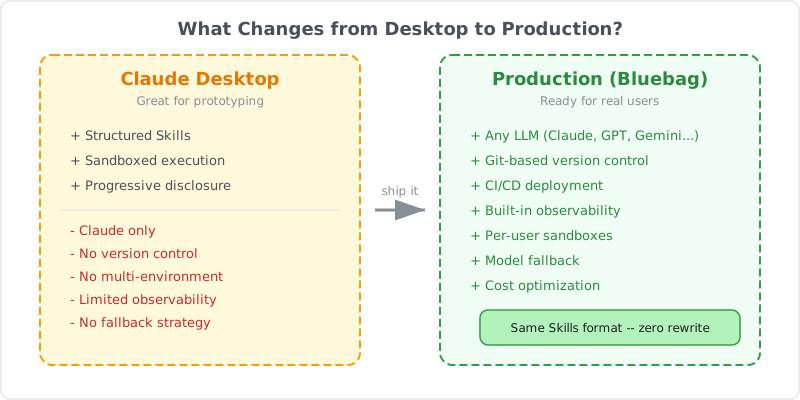
Here's what changes when you move from Claude Desktop to production systems.
1. LLM Lock-In
Claude Desktop Skills only work with Claude.
In development, this might be acceptable. You're prototyping, iterating, focused on getting the workflow right.
In production, this becomes a constraint:
Cost Optimization
Different models have different pricing. Claude Sonnet costs differently than GPT-4o or Gemini 1.5 Pro. If your agent processes millions of requests, model selection directly impacts your unit economics.
With Claude-only Skills, you can't optimize costs by switching models for different workloads.
Availability and Redundancy
Every API has downtime. Anthropic, OpenAI, Google. When Claude's API goes down, agents that depend exclusively on Claude Desktop Skills stop working.
Production systems need fallback strategies. If your primary model is unavailable, you should be able to route requests to an alternative without rewriting your Skills.
Model Evolution
New models ship constantly. GPT-5, Claude 4, Gemini 2.0. Each brings different capabilities, speeds, and costs.
If your Skills are locked to one provider, you can't take advantage of improvements elsewhere without significant rework.
2. Versioning and Portability
Claude Desktop Skills live in Anthropic's infrastructure. You can create them, use them, but you don't own the deployment.
This creates challenges:
Environment Isolation
In production, you typically run multiple environments: development, staging, production. You need to version Skills independently across these environments.
With Claude Desktop, there's no built-in way to version Skills or promote them through a deployment pipeline.
Cross-Team Collaboration
If multiple teams use the same Skills, you need a way to share, version, and update them without breaking dependent systems.
Claude Desktop doesn't provide a package management system for Skills. There's no npm install or pip install equivalent.
Backup and Recovery
If Anthropic's service has an issue, or if a Skill gets accidentally modified, you need a way to roll back to a known good state.
Without version control, this becomes manual and error-prone.
3. Observability and Debugging
When an agent breaks in production, you need to understand why.
Skill Execution Logs
Which Skills were invoked? What scripts ran? What were the inputs and outputs? How long did each step take?
Claude Desktop provides basic logging, but production systems need detailed telemetry integrated with your existing observability stack.
Error Attribution
When something fails, is it the model, the Skill, the sandbox, or the underlying infrastructure?
Production-grade systems need structured error reporting that distinguishes between these failure modes.
Performance Monitoring
How long does each Skill take to execute? Are there bottlenecks? Which Skills consume the most tokens?
Without this visibility, optimizing agent performance becomes guesswork.
What Production Agent Skills Require
Based on teams shipping agents at scale, here's what production Skill infrastructure needs:
LLM Agnostic
Skills should work with any LLM. Write once, run on Claude, GPT-4, Gemini, Llama, or whatever ships next year.
This requires:
- Model-agnostic tool calling formats
- Standardized Skill packaging
- Runtime that works across providers
Version Control and Deployment
Skills should be treated like code:
- Version controlled in Git
- Deployed through CI/CD pipelines
- Promoted across environments
- Rolled back when needed
Isolated Sandboxes
Each user or session should get an isolated sandbox. This prevents:
- Data leakage between users
- State pollution across requests
- Security vulnerabilities from shared environments
Observability
Production Skill platforms need:
- Execution traces for every Skill invocation
- Performance metrics per Skill
- Error logs with full context
- Integration with existing monitoring tools
Dependency Management
Skills often need external packages. Python libraries, Node modules, system utilities.
Production platforms need:
- Declarative dependency specification
- Automatic installation in sandboxes
- Version pinning for reproducibility
How Bluebag Bridges the Gap
This is why we built Bluebag.
We took Anthropic's Agent Skills specification and built production infrastructure around it.
Same Skills, Any LLM
Bluebag implements the Agent Skills protocol in an LLM-agnostic way. The same Skill works with:
- Claude (Sonnet, Opus, Haiku)
- OpenAI (GPT-4o, GPT-4, GPT-3.5)
- Google (Gemini 1.5 Pro, Flash)
- Anthropic competitors
- Open source models (Llama, Mixtral)
Switch models without rewriting Skills. Test the same workflow across different LLMs. Optimize costs by routing different request types to different models.
Git-Based Workflow
Skills are stored as files. Push them to Git, version them, deploy them through your existing CI/CD pipeline.
# Push a Skill to Bluebag
bluebag push ./my-skill

# Pull Skills to local development
bluebag pull my-skill

# Version and deploy like code
git tag v1.2.0
git push origin v1.2.0
Per-User Sandboxes
Every user gets an isolated sandbox. Files, state, and execution context are completely separate.
const bluebag = new Bluebag({
  apiKey: process.env.BLUEBAG_API_KEY,
  stableId: user.id, // Isolated sandbox per user
});
Built-In Observability
Every Skill execution generates structured logs. See exactly what ran, when, and why in the Bluebag Insights dashboard.
Dependency Management
Declare dependencies in requirements.txt or package.json. Bluebag installs them automatically in the sandbox.
# requirements.txt
pdfplumber==0.10.3
pandas==2.1.4
No manual setup. No environment configuration. Dependencies are installed and ready when your Skill runs.
Migration Path
If you've built Skills for Claude Desktop, migrating to Bluebag is straightforward.
1. Export Your Skills
Claude Desktop Skills follow the Agent Skills specification. The format is portable.
2. Push to Bluebag
npm install -g @bluebag/cli
bluebag login
bluebag push ./your-skill
3. Update Your Code
Before (Claude Desktop only):
// Locked to Claude
const response = await anthropic.messages.create({
  model: "claude-3-5-sonnet-20241022",
  messages: messages,
});
After (Any LLM):
import { Bluebag } from "@bluebag/ai-sdk";
import { openai } from "@ai-sdk/openai";

const bluebag = new Bluebag({
  apiKey: process.env.BLUEBAG_API_KEY,
});

const config = await bluebag.enhance({
  model: openai("gpt-4o"), // Or any other model
  messages: messages,
});

const result = streamText(config);
Same Skills. Different model. Zero rewrite.
When to Use Claude Desktop vs Bluebag
Use Claude Desktop Skills when:
- Prototyping and iterating quickly
- Building internal tools where vendor lock-in is acceptable
- Working exclusively in the Claude ecosystem
- You don't need multi-environment deployments
Use Bluebag when:
- Shipping to production
- You need LLM flexibility and cost optimization
- Multiple teams share Skills
- You require version control and deployment pipelines
- Observability and debugging are critical
- You want to avoid vendor lock-in
Conclusion
Claude Desktop Skills proved that structured procedural knowledge makes agents more reliable. Anthropic's architecture is sound.
The challenge is taking that architecture to production.
Production agents need LLM portability, version control, isolated sandboxes, and observability. They need to work across environments, scale with demand, and integrate with existing infrastructure.
Claude Desktop is where you prototype. Bluebag is where you deploy.
If you've built Skills for Claude Desktop and want to ship them to production, Bluebag provides the infrastructure you need. Same Skills, any LLM, production-ready from day one.
Resources
- Bluebag Documentation - Full SDK reference
- Agent Skills Specification - The open standard
- Bluebag CLI - Push and pull Skills
- Anthropic's Agent Skills - Original announcement
Shipping agents to production? Start with Bluebag and deploy Skills that work with any LLM.