Building AI Agents That Don't Break: The Infrastructure Checklist
Production agents need robust infrastructure. Here's the complete checklist for building agents that scale, recover from failures, and stay reliable under load.

Your agent works in development. Then you deploy to production and it breaks under real load.
Timeouts. Memory leaks. Failed requests. Inconsistent behavior. Users complaining.
The difference between agents that work and agents that break is infrastructure.
Here's the complete checklist for building production-grade agent infrastructure.
The Infrastructure Problem
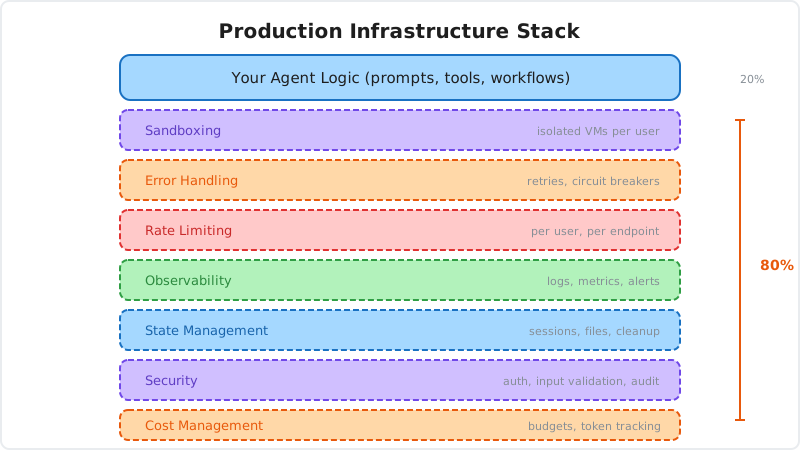
Most teams focus on the agent logic: prompts, tools, workflows. Infrastructure is an afterthought.
Then production happens:
- 1,000 concurrent users hit your agent
- API calls timeout
- Memory usage climbs until the server crashes
- Files accumulate on disk
- Costs spiral out of control
Your agent logic is fine. Your infrastructure isn't.
The Checklist
Use this checklist before deploying agents to production.
1. Execution Environment
What you need:
- Isolated sandboxes for code execution
- Automatic cleanup after execution
- Resource limits (CPU, memory, disk)
- Process isolation between users
- Fast sandbox creation (sub-second)
Why it matters:
Agents that execute code need isolation. Without it, users can access each other's data, consume unlimited resources, or compromise your server.
How to implement:
Use containers or VMs for isolation:
// Docker-based sandbox
const container = await docker.createContainer({
  Image: "python:3.11-slim",
  HostConfig: {
    Memory: 512 * 1024 * 1024, // 512MB limit
    CpuQuota: 50000,            // 50% CPU
    NetworkMode: "none",        // No network
  },
});

await container.start();
// Execute code
await container.remove({ force: true }); // Cleanup
Or use managed infrastructure:
const bluebag = new Bluebag({
  apiKey: process.env.BLUEBAG_API_KEY,
  stableId: userId, // Isolated per user
});

// Sandboxes created, managed, and cleaned up automatically
2. State Management
What you need:
- Session persistence across requests
- File storage with TTLs
- Conversation history management
- State cleanup for inactive sessions
- Database for long-term state
Why it matters:
Multi-turn conversations accumulate state. Without management, memory leaks occur and context windows explode.
How to implement:
Store session state with expiration:
// Redis for session state
await redis.setex(
  `session:${userId}`,
  3600, // 1 hour TTL
  JSON.stringify({
    messages,
    files,
    context,
  })
);

// Retrieve on next request
const session = await redis.get(`session:${userId}`);
Implement cleanup for old sessions:
// Cron job to clean up expired sessions
cron.schedule("0 * * * *", async () => {
  const expiredSessions = await db.sessions.findExpired();

  for (const session of expiredSessions) {
    await cleanupSession(session.id);
    await db.sessions.delete(session.id);
  }
});
3. Error Handling
What you need:
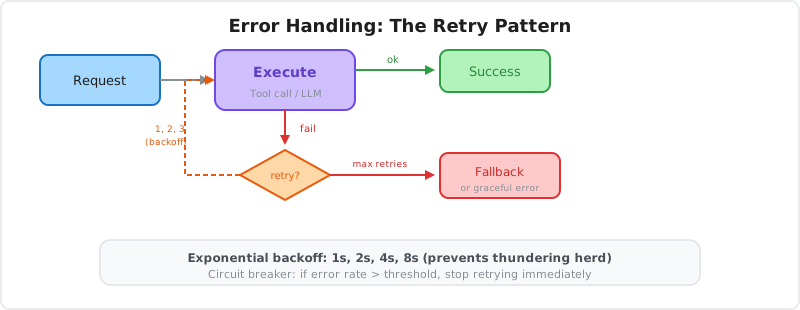
- Retry logic with exponential backoff
- Circuit breakers for failing services
- Graceful degradation
- User-friendly error messages
- Structured error logging
Why it matters:
APIs fail. Networks timeout. Models return errors. Without proper error handling, your agent crashes.
How to implement:
Retry with exponential backoff:
async function callWithRetry<T>(
  fn: () => Promise<T>,
  maxRetries = 3
): Promise<T> {
  for (let i = 0; i < maxRetries; i++) {
    try {
      return await fn();
    } catch (error) {
      if (i === maxRetries - 1) throw error;

      const delay = Math.pow(2, i) * 1000;
      await new Promise(resolve => setTimeout(resolve, delay));
    }
  }
  throw new Error("Max retries exceeded");
}

// Use it
const result = await callWithRetry(() =>
  generateText({ model, prompt })
);
Circuit breaker pattern:
class CircuitBreaker {
  private failures = 0;
  private lastFailureTime = 0;
  private state: "closed" | "open" | "half-open" = "closed";

  async execute<T>(fn: () => Promise<T>): Promise<T> {
    if (this.state === "open") {
      if (Date.now() - this.lastFailureTime > 60000) {
        this.state = "half-open";
      } else {
        throw new Error("Circuit breaker is open");
      }
    }

    try {
      const result = await fn();
      this.onSuccess();
      return result;
    } catch (error) {
      this.onFailure();
      throw error;
    }
  }

  private onSuccess() {
    this.failures = 0;
    this.state = "closed";
  }

  private onFailure() {
    this.failures++;
    this.lastFailureTime = Date.now();

    if (this.failures >= 5) {
      this.state = "open";
    }
  }
}
4. Rate Limiting
What you need:
- Per-user rate limits
- Per-endpoint rate limits
- Token bucket or sliding window algorithm
- Rate limit headers in responses
- Graceful handling when limits exceeded
Why it matters:
Without rate limiting, a single user can consume all resources or a malicious actor can abuse your system.
How to implement:
import { RateLimiterRedis } from "rate-limiter-flexible";

const rateLimiter = new RateLimiterRedis({
  storeClient: redis,
  points: 10,      // 10 requests
  duration: 60,    // per 60 seconds
  blockDuration: 300, // block for 5 minutes if exceeded
});

app.post("/api/agent", async (req, res) => {
  try {
    await rateLimiter.consume(req.userId);

    // Process request
    const result = await processAgentRequest(req.body);
    res.json(result);
  } catch (error) {
    res.status(429).json({
      error: "Too many requests. Please slow down.",
      retryAfter: 60,
    });
  }
});
5. Observability
What you need:
- Structured logging for all operations
- Distributed tracing across services
- Metrics (latency, throughput, errors)
- Alerting for anomalies
- Dashboards for real-time monitoring
Why it matters:
When something breaks in production, you need to understand what happened. Without observability, debugging is impossible.
How to implement:
Structured logging:
import winston from "winston";

const logger = winston.createLogger({
  format: winston.format.json(),
  transports: [
    new winston.transports.Console(),
    new winston.transports.File({ filename: "agent.log" }),
  ],
});

logger.info("Agent request", {
  userId,
  sessionId,
  model: "gpt-4o",
  promptTokens: 150,
  completionTokens: 300,
  latency: 1200,
  success: true,
});
Distributed tracing:
import { trace } from "@opentelemetry/api";

const tracer = trace.getTracer("agent-service");

async function processRequest(req) {
  const span = tracer.startSpan("process_agent_request");

  try {
    span.setAttribute("user_id", req.userId);
    span.setAttribute("model", req.model);

    const result = await generateText({ model, prompt });

    span.setAttribute("tokens", result.usage.totalTokens);
    span.setStatus({ code: SpanStatusCode.OK });

    return result;
  } catch (error) {
    span.setStatus({ code: SpanStatusCode.ERROR });
    span.recordException(error);
    throw error;
  } finally {
    span.end();
  }
}
6. Cost Management
What you need:
- Token usage tracking per user
- Cost estimation before execution
- Budget alerts
- Model selection based on cost
- Caching for repeated queries
Why it matters:
LLM costs can spiral quickly. Without tracking, you'll get a surprise bill at the end of the month.
How to implement:
Track token usage:
async function trackCost(userId: string, usage: Usage) {
  const cost = calculateCost(usage, model);

  await db.usage.create({
    userId,
    model,
    promptTokens: usage.promptTokens,
    completionTokens: usage.completionTokens,
    cost,
    timestamp: new Date(),
  });

  // Check if user exceeded budget
  const monthlyUsage = await db.usage.getMonthly(userId);
  const totalCost = monthlyUsage.reduce((sum, u) => sum + u.cost, 0);

  if (totalCost > USER_BUDGET) {
    await notifyUser(userId, "Budget exceeded");
    throw new Error("Budget limit reached");
  }
}
Implement caching:
async function generateWithCache(prompt: string) {
  const cacheKey = `prompt:${hash(prompt)}`;

  // Check cache
  const cached = await redis.get(cacheKey);
  if (cached) {
    return JSON.parse(cached);
  }

  // Generate
  const result = await generateText({ model, prompt });

  // Cache for 1 hour
  await redis.setex(cacheKey, 3600, JSON.stringify(result));

  return result;
}
7. Scaling
What you need:
- Horizontal scaling (multiple instances)
- Load balancing
- Stateless architecture where possible
- Queue-based processing for long tasks
- Auto-scaling based on load
Why it matters:
A single server can't handle thousands of concurrent users. You need to scale horizontally.
How to implement:
Stateless API servers:
// Don't store state in memory
// Bad:
let sessions = {};

// Good: Use external state store
const session = await redis.get(`session:${userId}`);
Queue-based processing:
import Bull from "bull";

const agentQueue = new Bull("agent-tasks", {
  redis: { host: "localhost", port: 6379 },
});

// Add task to queue
app.post("/api/agent", async (req, res) => {
  const job = await agentQueue.add({
    userId: req.userId,
    prompt: req.body.prompt,
  });

  res.json({ jobId: job.id });
});

// Process tasks
agentQueue.process(async (job) => {
  const result = await processAgentRequest(job.data);
  return result;
});
Auto-scaling with Kubernetes:
apiVersion: autoscaling/v2
kind: HorizontalPodAutoscaler
metadata:
  name: agent-api
spec:
  scaleTargetRef:
    apiVersion: apps/v1
    kind: Deployment
    name: agent-api
  minReplicas: 2
  maxReplicas: 10
  metrics:
  - type: Resource
    resource:
      name: cpu
      target:
        type: Utilization
        averageUtilization: 70
8. Security
What you need:
- API key authentication
- Input validation and sanitization
- Sandboxed code execution
- Network restrictions
- Secrets management
- Audit logs
Why it matters:
Agents are attack surfaces. Without security, malicious users can exploit your system.
How to implement:
API key authentication:
app.use(async (req, res, next) => {
  const apiKey = req.headers["x-api-key"];

  if (!apiKey) {
    return res.status(401).json({ error: "Missing API key" });
  }

  const user = await db.users.findByApiKey(apiKey);

  if (!user) {
    return res.status(401).json({ error: "Invalid API key" });
  }

  req.userId = user.id;
  next();
});
Input validation:
import { z } from "zod";

const requestSchema = z.object({
  prompt: z.string().min(1).max(10000),
  model: z.enum(["gpt-4o", "claude-3-5-sonnet-20241022"]),
  temperature: z.number().min(0).max(2).optional(),
});

app.post("/api/agent", async (req, res) => {
  try {
    const validated = requestSchema.parse(req.body);
    // Process request
  } catch (error) {
    res.status(400).json({ error: "Invalid request" });
  }
});
9. Deployment
What you need:
- CI/CD pipeline
- Blue-green or canary deployments
- Rollback capability
- Health checks
- Zero-downtime deployments
Why it matters:
Manual deployments are error-prone. Automated pipelines ensure consistency and enable fast rollbacks.
How to implement:
GitHub Actions CI/CD:
name: Deploy Agent API

on:
  push:
    branches: [main]

jobs:
  deploy:
    runs-on: ubuntu-latest
    steps:
      - uses: actions/checkout@v2

      - name: Run tests
        run: npm test

      - name: Build Docker image
        run: docker build -t agent-api:${{ github.sha }} .

      - name: Push to registry
        run: docker push agent-api:${{ github.sha }}

      - name: Deploy to Kubernetes
        run: |
          kubectl set image deployment/agent-api \
            agent-api=agent-api:${{ github.sha }}
          kubectl rollout status deployment/agent-api
Health checks:
app.get("/health", async (req, res) => {
  try {
    // Check dependencies
    await redis.ping();
    await db.query("SELECT 1");

    res.json({
      status: "healthy",
      timestamp: new Date().toISOString(),
    });
  } catch (error) {
    res.status(503).json({
      status: "unhealthy",
      error: error.message,
    });
  }
});
10. Monitoring and Alerting
What you need:
- Real-time dashboards
- Error rate monitoring
- Latency percentiles (p50, p95, p99)
- Cost tracking
- Automated alerts for anomalies
Why it matters:
You need to know when things break before users complain.
How to implement:
Prometheus metrics:
import { Counter, Histogram } from "prom-client";

const requestCounter = new Counter({
  name: "agent_requests_total",
  help: "Total agent requests",
  labelNames: ["model", "status"],
});

const latencyHistogram = new Histogram({
  name: "agent_request_duration_seconds",
  help: "Agent request latency",
  labelNames: ["model"],
});

app.post("/api/agent", async (req, res) => {
  const start = Date.now();

  try {
    const result = await processRequest(req.body);

    requestCounter.inc({ model: req.body.model, status: "success" });
    res.json(result);
  } catch (error) {
    requestCounter.inc({ model: req.body.model, status: "error" });
    res.status(500).json({ error: error.message });
  } finally {
    const duration = (Date.now() - start) / 1000;
    latencyHistogram.observe({ model: req.body.model }, duration);
  }
});
Alerting rules:
groups:
  - name: agent_alerts
    rules:
      - alert: HighErrorRate
        expr: rate(agent_requests_total{status="error"}[5m]) > 0.1
        annotations:
          summary: "High error rate detected"

      - alert: HighLatency
        expr: histogram_quantile(0.95, agent_request_duration_seconds) > 5
        annotations:
          summary: "95th percentile latency above 5s"
The Bluebag Approach
Bluebag handles most of this infrastructure so you don't have to build it.
What Bluebag provides:
Managed Sandboxes
Isolated VMs created in sub-90ms. Automatic cleanup. Resource limits enforced.
Built-In Observability
Every Skill execution logged with duration, exit codes, and session metadata. Performance metrics tracked in the Insights dashboard.
State Management
Per-user sessions with automatic persistence. Files stored with TTLs. Cleanup handled automatically.
Cost Optimization
Progressive disclosure minimizes token usage. Skills load knowledge on demand.
Security
VM isolation. Network restrictions. Audit logs.
Focus on your agent logic. Bluebag handles the infrastructure.
const bluebag = new Bluebag({
  apiKey: process.env.BLUEBAG_API_KEY,
  stableId: userId,
});

// All infrastructure handled
const config = await bluebag.enhance({ model, messages });
const result = streamText(config);
The Complete Checklist
Before deploying to production:
Execution
- Isolated sandboxes
- Automatic cleanup
- Resource limits
- Fast creation
State
- Session persistence
- File storage with TTLs
- Conversation history
- Cleanup for inactive sessions
Reliability
- Retry logic
- Circuit breakers
- Graceful degradation
- Error handling
Performance
- Rate limiting
- Caching
- Horizontal scaling
- Load balancing
Observability
- Structured logging
- Distributed tracing
- Metrics
- Alerting
Cost
- Token tracking
- Budget alerts
- Cost estimation
- Model selection
Security
- Authentication
- Input validation
- Sandboxing
- Audit logs
Deployment
- CI/CD pipeline
- Health checks
- Rollback capability
- Zero-downtime deploys
Conclusion
Agent logic is 20% of the work. Infrastructure is 80%.
Most teams underestimate infrastructure needs. They focus on prompts and tools, then hit production issues:
- Sandboxes that don't scale
- State management that leaks memory
- No error handling
- Costs that spiral
- Security vulnerabilities
Build infrastructure from day one. Use this checklist before deploying.
Or use managed infrastructure that handles it for you. Bluebag provides production-grade sandboxes, state management, observability, and security so you can focus on building agents.
Agents that work in production need production infrastructure.
Resources
- Bluebag Documentation - Managed agent infrastructure
- The Twelve-Factor App - Principles for production apps
- Site Reliability Engineering - Google's SRE practices
- Kubernetes Best Practices - Container orchestration
Building production agents? Start with Bluebag and get infrastructure that scales.